Sell your plans without writing billing code
Billing in a SaaS is more than a payment form. Someone has to know what each plan gives, keep trials and cancellations straight, show customers their invoices and stop them at a limit. sumwerk does that on top of your Stripe account, and your app asks it what a customer may do. In early access.
Join the waitlist Free while you build. Built on Stripe, hosted in Germany.
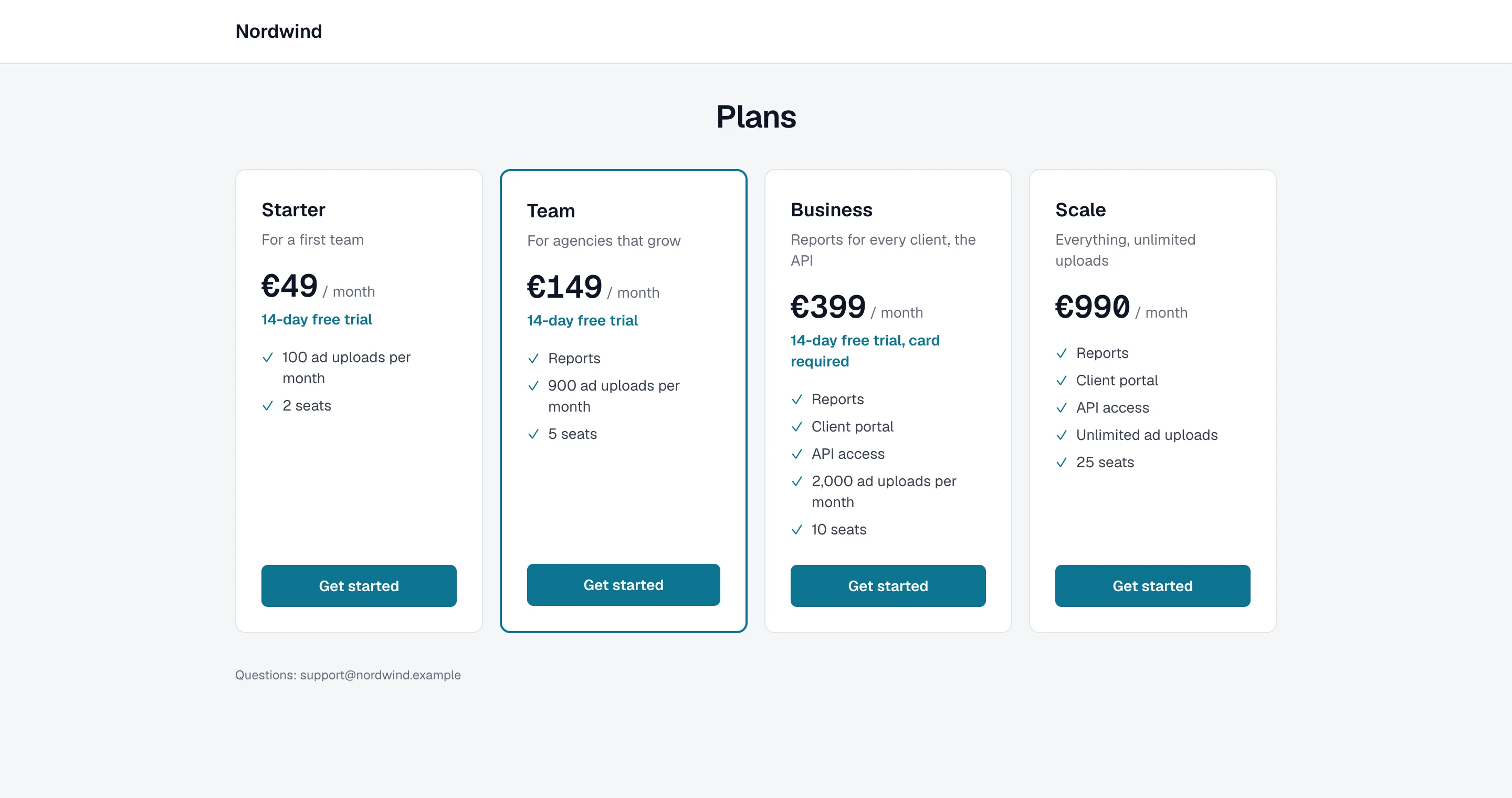
Plans, and what each gives
Describe what your app offers once: features that are on or off, and limits such as seats, projects or uploads per month. Then say what each plan gives. Billing → Pricing is one table: the plans across, and down their prices per billing period and currency, their rules, what each gives and the extras. New prices are drafts until you publish them to Stripe.
Tier, plan, price: a tier groups plans for your reports (Team, Agency, Enterprise), a plan is what a customer gets, a price is what they pay. Change a plan for everyone, or for new customers only: those already on it keep the version they bought until you move them.
Already selling on Stripe
Billing starts with how you sell today. Billing → Stripe prices lists what Stripe has and suggests what each price is from how your subscriptions use it: a plan, an add-on sold with the plan it rides along with, or credits. Accept the suggestions one by one or all at once; only what waits for a decision stays open. Move every price of a product to another plan in one step. Nothing changes in Stripe while you sort.
Starting fresh instead? Pick a pricing model (per seat, tiers with limits, plan plus credits, flat plus add-ons) and change it from there, or start with plans and no payments at all.
Who can get a plan, and what they do themselves
A plan is for sale on your pricing page, by link only for a deal your team sends, or closed: nobody new gets it, and its customers keep it with its price and what it gives. Retire a plan and its customers move to another one at their next renewal.
Per plan you say what its customers do themselves: everything, only their extras (the plan and canceling go through sales), or nothing, for a contract. Customers on a contract see their own plan and their account manager, and a change they ask for becomes a task. Upload their signed contract as a PDF on the customer's page and they open it on their account page.
Extras and credits
An add-on is sold with one plan or with any plan, and every customer is offered their own plan's price for it, in the interval they pay. Credit bundles are paid at once and used once the plan's own amount is used up, the oldest first; they lapse after the months you set. On Pricing each extra is one group, with a row per billing period and currency.
Trials and what happens after a cancellation
Each plan has its own trial, with or without a card up front. After a cancellation a customer falls back to your free plan, keeps the plan for a few days, moves to a plan of its own, or keeps it. Your app sees the rule, not the details.
A checkout of your own
Customers pick a plan, add-ons and a promotion code on a checkout that carries your name and color, on your own domain if you like. Stripe's payment form takes the card, so card details never pass through sumwerk, and Stripe's own preview shows the amount, tax and proration before anyone pays.
The same pages show your customers their plan, their invoices with receipts and payment methods, let them change their billing details, upgrade, downgrade or cancel, and ask why when they leave. Billing → Preview opens every page as any of your customers sees it, without charging or changing anything.
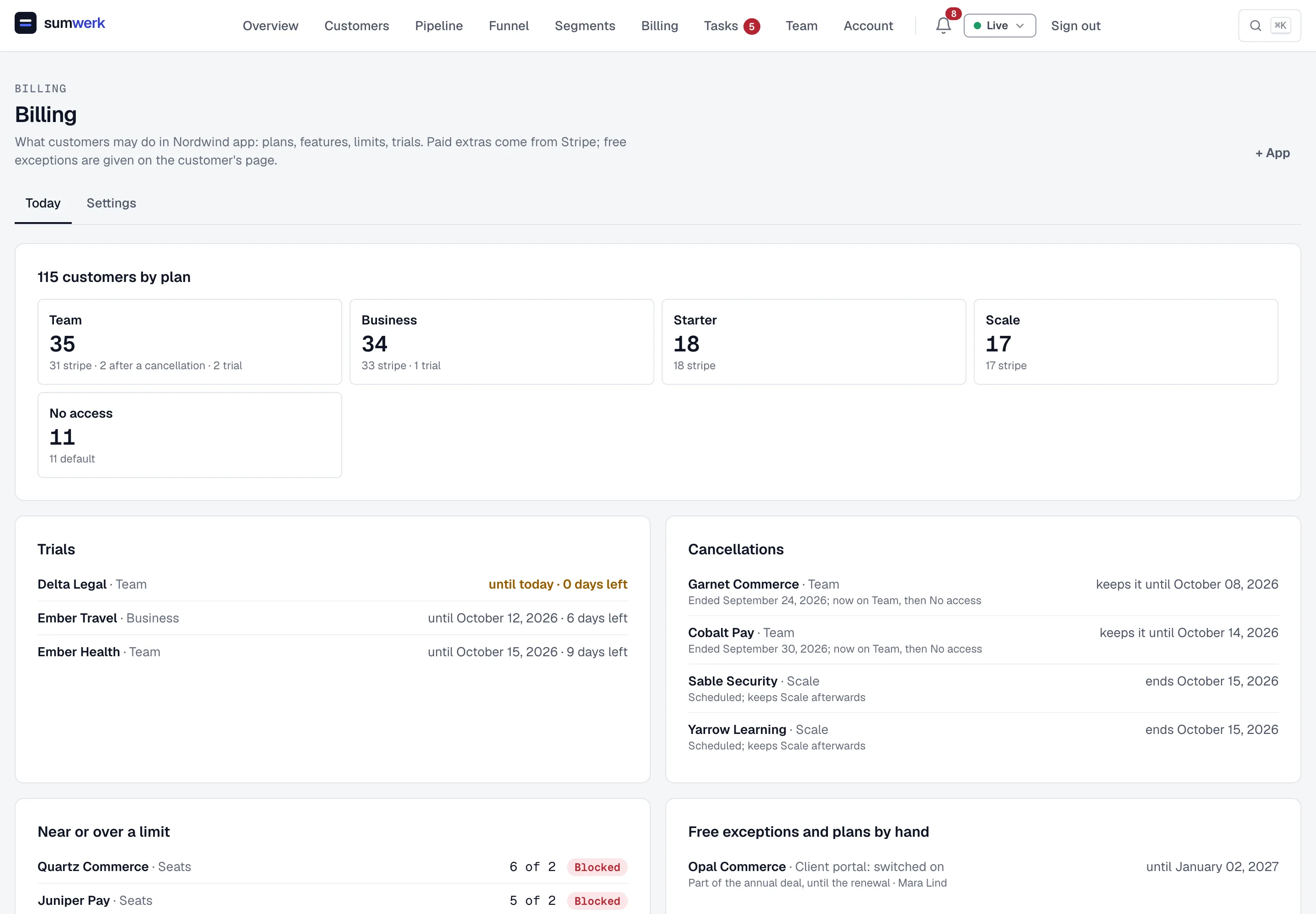
One overview, and the exceptions by hand
Billing's overview shows customers per tier and plan, trials soonest end first, cancellations still to come and those of the last 90 days, customers near or over a limit, and free exceptions and plans given by hand. Each card pages ten at a time and sorts on its own.
On a customer's page the team extends a running trial by a number of days, gives a feature or a higher limit for free with a reason and, if it should, an end, gives credits, or gives a plan by hand. Each of them says who gave it and why.
Limits checked in your app
Your app asks sumwerk what an organization may do and gets the answer from a cache next to it in milliseconds, with an SDK for Ruby, TypeScript and React. Usage is counted as your app reports it; at 80 % and at the limit your app and your team hear about it, and a downgrade that would not fit is refused.
Stripe stays your payment processor
Your money keeps flowing through your own Stripe account, connected through the sumwerk Stripe App without a key to paste. sumwerk only reads it until an owner switches on billing management; from then on every change shows Stripe's preview first and is written down with who asked for it and why. Refunds and payouts stay in Stripe.
Video · 1:44
Setting up billing, in two minutes
From your Stripe products to plans, prices, extras and what each plan gives. Shown on invented example data.
The guide, step by stepQuestions
- Do I need to move away from Stripe?
- No. sumwerk works on top of your Stripe account. Products, prices, customers and subscriptions stay in Stripe, and so does the money.
- Is Billing available to everyone?
- Billing is in early access, and every sumwerk account has it. Plans, limits and the answers to your app work without changing anything in Stripe; sumwerk sells plans and changes subscriptions only once an owner switches on billing management.
- Does my app need a library?
- No, the answers are plain JSON over HTTPS. There are SDKs for Ruby, TypeScript and React if you want the cache and the checks done for you.
- Can my app's staging ask the same questions?
- Yes. A sumwerk sandbox gets your app with its features, plans and limits, and answers with its own swk_test_ token.
Goes well with
- PipelineDeals open and close by themselves from booked calls, sign-ups, trials, plan limits and Stripe payments, for new business, expansion, renewals and retention.
- MRR you can provesumwerk computes MRR from the state of each Stripe subscription, not from prorated invoices, and links every movement to the Stripe invoice or event behind it.
- APIPull MRR, movements and customers out of sumwerk, push leads, trials, product usage, notes and tasks in, manage automations and receive signed webhooks.
Free while you build
Connect Stripe in one click and see your revenue, customers and pipeline in a few minutes. Switch on billing management when you want sumwerk to sell your plans in Stripe. Every module is free during early access. Sign-ups go through a waitlist for now: we let companies in one by one.