See the revenue that is about to leave
A cancellation that is scheduled and a payment that failed are still MRR today. sumwerk shows them next to the number, sorted by how likely the money is lost, so someone can act while it still helps.
Start free Free during early access. Read-only Stripe key, hosted in Germany.
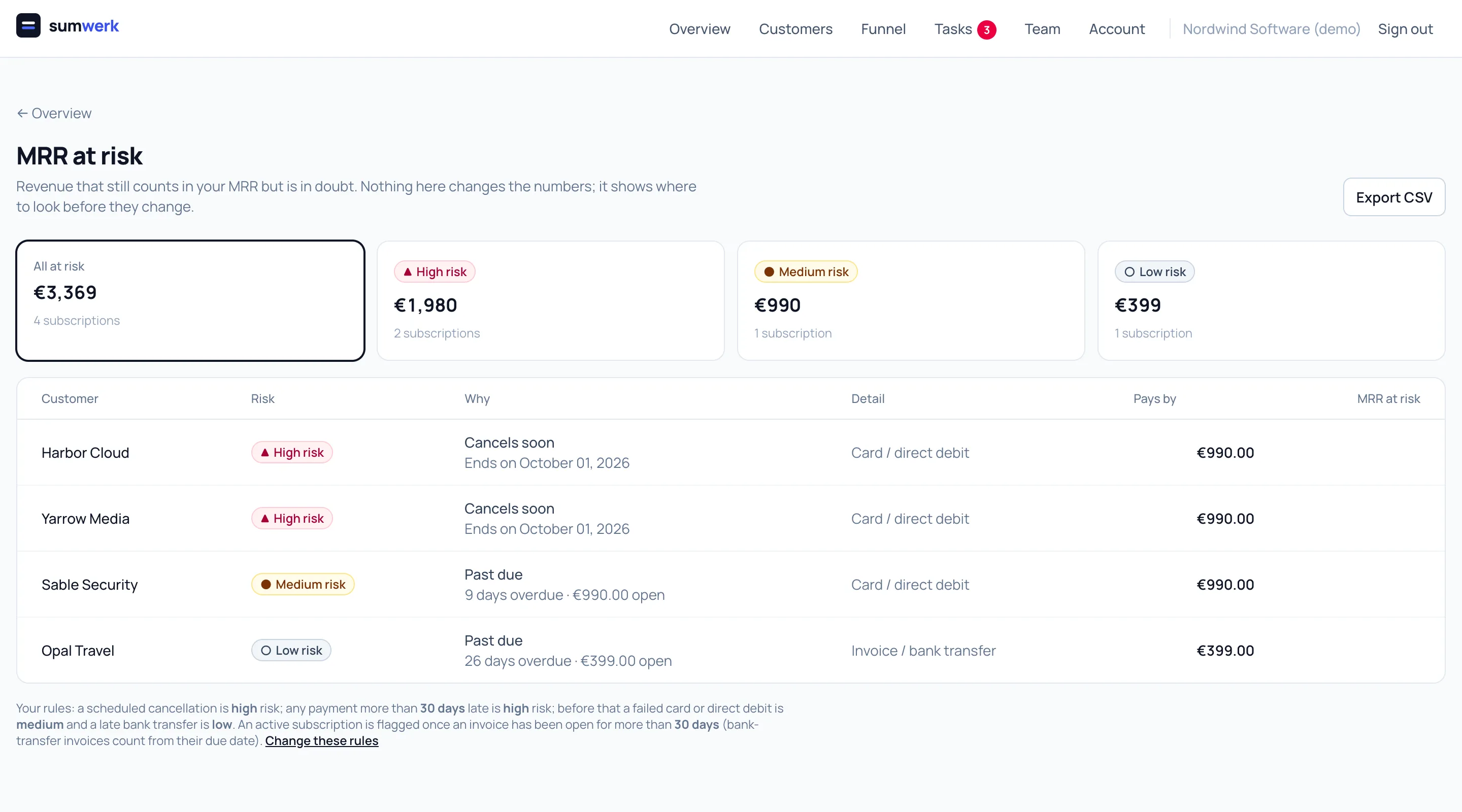
Payments, cancellations and your own signals in one list
A cancellation is scheduled. A card or direct-debit payment failed and Stripe is retrying. An invoice has been open longer than you allow. Each entry shows the customer, the MRR in question, how late it is or when it ends.
Your own rules, from what you know about a customer
Stripe knows who paid. You know who still uses what they pay for. Add rules of your own from any customer attribute you send to sumwerk: no project created in 30 days, fewer than two active seats, no owner assigned. A paying customer who matches is flagged with the level you choose, next to the payment risks and counted once. The rule page shows how many customers and how much MRR each rule holds for today.
Severity is yours to define
A bank-transfer invoice that is ten days late is routine; a card that failed three weeks ago is not. You set after how many days a late payment becomes high risk and how serious each case is. The defaults are sensible; the rules are per account.
A flag, never a correction
MRR at risk does not change MRR. The number stays what Stripe's subscriptions say it is; the flag sits next to it. When the payment arrives or the cancellation is withdrawn, the flag goes.
Let it create the follow-up
A scheduled cancellation or a failed payment is also an event, and so is a customer who starts to match one of your own rules. An automation can turn it into a task for the customer's owner the same hour.
Questions
- Where do I see it?
- On the overview as one card with the total and the split by severity, on its own page, on each customer, in the CSV export and in the API.
- Does it work for invoices paid by bank transfer?
- Yes. They count from their due date, not from the day the invoice was created.
Goes well with
- AutomationsWhen a trial starts, a payment fails or a cancellation is scheduled, sumwerk adds a task, sets the owner, tags the customer or calls your webhook.
- MRR you can provesumwerk computes MRR from the state of each Stripe subscription, not from prorated invoices, and links every movement to the Stripe invoice or event behind it.
- Tasks and notesWrite notes, log calls with their length and keep tasks per customer in sumwerk - with the MRR, the ledger and the payment risk on the same page.
Connect Stripe and check your own numbers
A restricted, read-only key is all it takes. The first import runs in a few minutes; every number you see opens into the customers and Stripe references behind it.